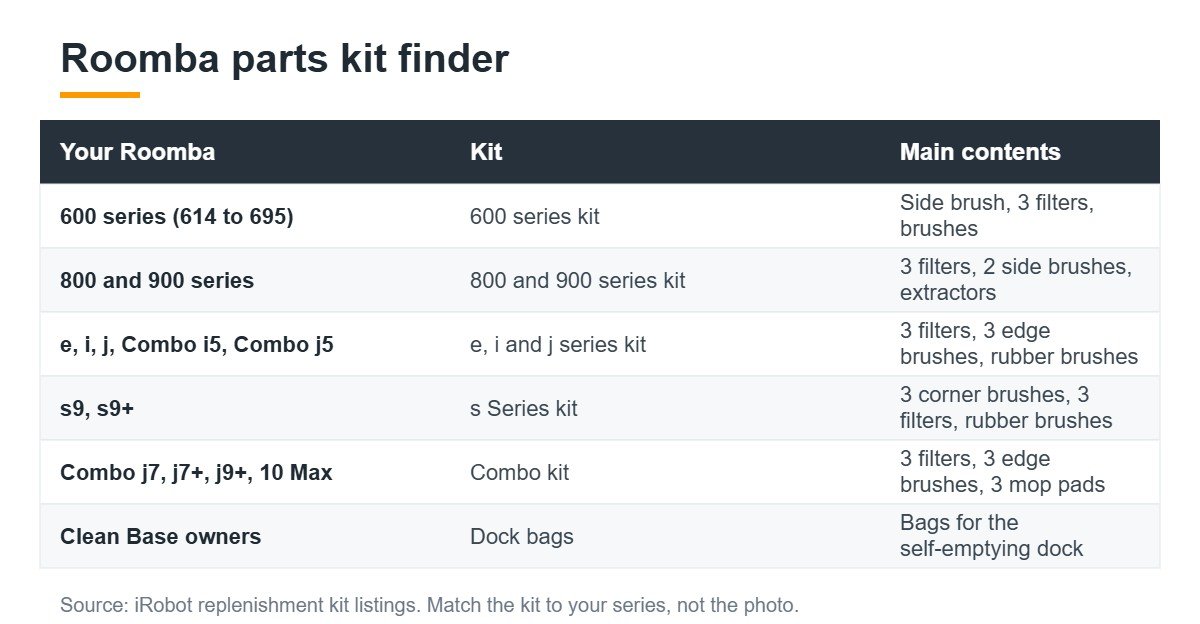
For most owners, the smartest Roomba replacement parts buy is the iRobot replenishment kit made for their series. These kits bundle the filters and brushes that wear out first: the 600 series kit for 614 to 695 robots, the 800 and 900 series kit for models such as the 890 and 960, the e, i and j kit for the i3, i7 and j7, the s Series kit for the s9, and the Combo kit for the j7+, j9+ and 10 Max. Pick the kit by robot series, not by photo, because the brushes and filters differ between them.
Kits to start with
- Roomba 600 series: iRobot replenishment kit Side brush, three AeroVac filters, bristle and beater brushes, cleaning tool.
- Roomba 800 and 900 series: iRobot replenishment kit Three AeroForce filters, two side brushes and a set of extractors.
- Roomba e, i and j series: iRobot replenishment kit Three filters, three edge brushes and a set of rubber brushes.
- Roomba s9 and s9+: iRobot s Series kit Three corner brushes, three filters and a set of rubber brushes.
As an Amazon Associate we earn from qualifying purchases.
We chose these kits from iRobot’s own product listings and the maintenance schedules in iRobot’s support documents, and we read owner feedback on retailer pages. We have not tested each kit ourselves. Prices change often, so we list contents and fit rather than prices.
Best Roomba Replacement Parts by Series: Quick Table
| Your Roomba | Kit to buy | What is inside |
|---|---|---|
| 600 series (614 to 695) | Replenishment Kit for Roomba 600 series | 1 side brush, 3 AeroVac filters, bristle and beater brushes, cleaning tool |
| 800 and 900 series (801 to 985) | Replenishment Kit for Roomba 800 and 900 series | 3 AeroForce filters, 2 side brushes, 1 set of extractors |
| e5, e6, i3, i4, i7, i8, j6, j7, Combo i5, Combo j5 | Replenishment Kit for Roomba e, i and j series (4639168) | 3 filters, 3 edge brushes, 1 set of rubber brushes |
| s9, s9+ | Replenishment Kit for Roomba s series (4646124) | 3 corner brushes, 3 filters, 1 set of rubber brushes |
| Combo j7, j7+, j9+, Combo 10 Max | Replenishment Kit for Roomba Combo j7, j7+, j9+ and 10 Max (4812261) | 3 filters, 3 edge brushes, 3 microfiber mopping pads |
| i3+, i7+, j7+ and other Clean Base owners | iRobot dirt disposal bags or refill kit | Bags for the self-emptying dock (count varies by pack) |
The 6 Best Roomba Replacement Parts Kits
1. iRobot Replenishment Kit for Roomba 600 Series: best for 614 to 695 robots
The 600 series is the most common Roomba still in use, and this is the kit most owners need. It contains one edge-sweeping side brush, three AeroVac filters, one bristle brush, one beater brush and a round cleaning tool for cutting hair off the brushes. iRobot lists it for the 600 series only. Three filters cover about six months at the usual two-month change interval.
Older 500 series robots use similar-looking parts, but check the listing before you assume they fit. Check the 600 series kit on Amazon
2. iRobot Replenishment Kit for Roomba 800 and 900 Series: best for 890, 960 and 980
The 800 and 900 series swapped bristle brushes for rubber extractors, so they need a different kit. This one holds three AeroForce high-efficiency filters, two side brushes and one set of replacement extractors. Worn extractors are a common reason these robots leave grit behind on carpet, so replacing them with the filters makes a visible difference. Check the 800 and 900 series kit on Amazon
3. iRobot Replenishment Kit for Roomba e, i and j Series: best for i3, i7 and j7
This kit fits the widest range of current robots: the e, i and j series plus the Combo i5 and Combo j5. Inside are three high-efficiency filters, three edge-sweeping brushes and one set of dual multi-surface rubber brushes. iRobot says the rubber brushes resist tangling with pet hair, and the filters trap 99% of dog and cat dander allergens. It does not fit the Combo j7+ or Combo j9+. Check the e, i and j series kit on Amazon
4. iRobot Replenishment Kit for Roomba s Series: best for s9 and s9+
The s Series has a wider brush deck and a corner brush angled into edges, so it takes its own kit. You get three corner brushes, three high-efficiency filters and one set of dual multi-surface rubber brushes. It usually costs more than the other vacuum kits, in line with the price of the robot it fits. Check the s Series kit on Amazon
5. iRobot Replenishment Kit for Roomba Combo j7, j7+, j9+ and 10 Max: best for Combo owners
The bigger Combo robots vacuum and mop, so their kit swaps the rubber brushes for mopping pads. It holds three high-efficiency filters, three edge-sweeping brushes and three microfiber mopping pads. Buy rubber brushes separately when yours wear out. Check the Combo kit on Amazon
6. iRobot Dirt Disposal Bags: best for Clean Base and AutoEmpty docks
If your robot empties itself into a dock, the bag in that dock is a regular purchase too. iRobot sells bag packs and a combined refill kit for i+ and j+ robots, and docks from different generations can take different bags. Check that the bag pack names your dock before you order. Our guide on how to empty a Roomba covers both the bin and the dock. Check iRobot dock bags on Amazon
How Often to Replace Roomba Parts
These intervals follow iRobot’s guidance and the schedule in our Roomba troubleshooting guide. Homes with pets, long hair or thick rugs sit at the short end of each range.
| Part | Clean | Replace |
|---|---|---|
| Filter | Weekly, by tapping out dust | About every 2 months |
| Main brushes or extractors | Weekly with pets, otherwise every 2 weeks | Every 6 to 12 months |
| Edge or side brush | Every 2 weeks | When bristles bend or fray |
| Front caster wheel | Every 2 weeks | About every 12 months |
| Dock bag (self-emptying models) | Not applicable | When the app says the bag is full |
Signs Your Roomba Needs New Parts
- Fine dust is left behind on hard floors, or suction sounds weaker. A clogged filter is the usual cause.
- The side brush has bent or missing bristles and no longer flicks debris from edges.
- Rubber extractors have splits or flattened fins, or bristle brushes look bald in places.
- The robot reports a brush error even after cleaning. Our guide to a Roomba brush that is not spinning covers the checks.
- Error 14 appears after a filter change, which usually means the filter or bin is not seated. See Roomba Error 14.
Genuine iRobot vs Generic Roomba Parts Kits
Generic kits are cheaper and often include more pieces, such as six filters instead of three. Many owners of 600 and 800 series robots use them happily. The trade-offs are fit and wear: a filter that seals loosely lets dust past, and softer rubber extractors can wear out faster.
Genuine kits cost more per piece but match the robot’s fittings and keep the warranty position clear. A sensible middle path is to buy genuine filters and brushes for the parts that touch the floor and the airflow, and keep the money you save for the next kit. Whichever you choose, make sure the listing names your series.
How to Fit the Main Parts
Filter: pull the bin out, open the filter door or lift the filter by its tab, and click the new one in with the arrows facing the right way. Our Roomba filter guide shows the steps with photos.
Main brushes or extractors: turn the robot over, squeeze the tabs on the brush frame, and lift the brushes out. Pull the end caps off the old brushes and move them to the new ones if your kit does not include them.
Side brush: on most models a single small screw holds it on, so keep a small Phillips screwdriver with the kit.
Charging contacts: while the robot is upside down, wipe its contacts and the dock’s contacts. Dirty contacts are a common cause of the problems in our Roomba won’t charge guide.
Parts for the 2025 Roomba Models
iRobot’s 2025 line-up, which includes the Roomba 105, the 205 DustCompactor and the Plus and Max models, uses its own batteries and, in most cases, its own brushes and filters. iRobot sells separate kits for these robots and names them after the model. Search by the model name on the label under your robot, and skip kits that only say they fit “Roomba”. If you are still choosing between repairing an older robot and buying a new one, our guide on which Roomba to buy compares the current models.
How to Make Roomba Parts Last Longer
- Empty the bin after every run, so dust does not pack into the filter.
- Cut hair off the brushes and end caps once a week with the cleaning tool from your kit.
- Tap the filter clean against the inside of a bin bag between changes instead of washing it.
- Keep the area around the dock clear, so the robot docks cleanly and the contacts stay aligned. Our guide on why a Roomba won’t dock covers placement.
- Run shorter, more frequent jobs in homes with pets. Light loads are easier on brushes and bearings than one heavy run a week.
Which Kit Should You Buy First?
If you are not sure where to start, buy the kit for your series and change the filter and side brush right away. Swap the main brushes when the kit’s next filter goes in, unless they are already worn. Owners with pets can compare robots that handle hair better in our list of the best robot vacuums for dog hair, and anyone weighing a new robot against new parts can check how much a Roomba costs today.
Roomba Replacement Parts FAQ
What are the best Roomba replacement parts?
The best Roomba replacement parts are the iRobot replenishment kit made for your series. Each kit bundles the filters and brushes that wear out first, so one box covers several months of upkeep. Match the kit name to your robot: 600, 800 and 900, e, i and j, s, or Combo j7+, j9+ and 10 Max.
How often should I replace Roomba parts?
Replace the filter about every two months, the edge brush when its bristles bend or fray, and the main brushes or extractors every 6 to 12 months depending on pets and floor type. Homes with long hair or pets go through parts faster.
Are generic Roomba parts kits worth it?
Generic kits cost less and many fit well, especially for the 600 and 800 series. Quality varies, though: filters may seal less tightly and rubber extractors can wear faster. Genuine iRobot parts keep the warranty position clear and match the robot’s sensors and fittings.
Does the e, i and j kit fit the Roomba Combo j7+?
No. iRobot says the e, i and j series kit does not fit the Combo j7+ or Combo j9+. Those robots use the Combo j7, j7+, j9+ and 10 Max kit, which includes mopping pads instead of rubber brushes.
What is in the Roomba 600 series replenishment kit?
The iRobot 600 series kit contains one edge-sweeping side brush, three AeroVac filters, one bristle brush, one beater brush and a round cleaning tool for clearing hair from the brushes.
Can I wash a Roomba filter instead of replacing it?
No. Water damages the pleated filter material and can leave moisture in the bin. Tap the filter clean between changes and replace it on schedule. Our filter cleaning guide shows how.
Why does my Roomba say the bin is missing after I change the filter?
The filter is part of the bin on many models, and the robot reports Error 14 if it is not seated. Take the bin out, refit the filter until it clicks, and slide the bin back in.
Do I need new parts if my Roomba brush stops spinning?
Not in every case. Hair wrapped around the brush ends and bearings is the usual cause. Clean the brushes and end caps first, then replace them if they are cracked or the bristles are worn flat.
