The right Roomba replacement battery depends on your series, so buy the iRobot pack listed for it: the 3300 mAh lithium-ion battery (part 4462425) for a Roomba 960, 980, 985 and most 600 and 800 models, the McKinley battery (4854069) for e, i and most j robots, the 4460 mAh pack (4844236) for Combo j7+, j9+ and 10 Max, and the s Series pack (4650994) for the s9 and s9+. Read the model number under your robot before you order, because several packs look alike and are not interchangeable.
Quick picks by series
- Roomba 600, 800 and 900 series: iRobot 3300 mAh battery (4462425) The longest-running iRobot pack for the classic round Roombas it fits.
- Roomba e, i and j series: iRobot McKinley battery (4854069) Current iRobot replacement for the i3, i7, e5, e6 and most j robots.
- Roomba Combo j7+, j9+ and 10 Max: iRobot 4460 mAh battery (4844236) The high-capacity pack for the larger Combo robots.
- Roomba s9 and s9+: iRobot s Series 3300 mAh battery (4650994) The only pack listed for the D-shaped s Series.
As an Amazon Associate we earn from qualifying purchases.
We built this list from iRobot’s own battery compatibility chart and part listings, then checked owner feedback on retailer pages. We have not lab-tested these batteries ourselves, so the run times below are the figures iRobot publishes. If your robot has started cutting jobs short, read our guide on why a Roomba won’t charge first, because dirty contacts cause the same symptoms as a worn battery.
Best Roomba Replacement Battery by Series: Quick Table
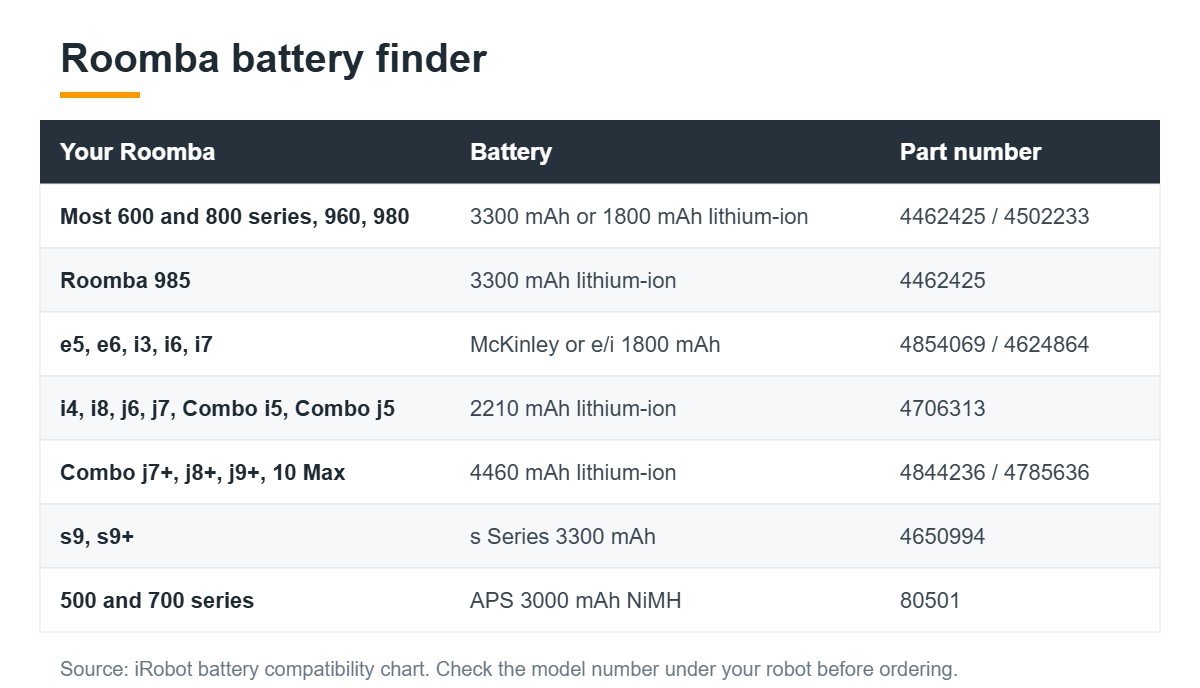
Find your robot in the left column. The part number is the safest thing to search for, because listing titles vary between sellers.
| Your Roomba | Battery to buy | Part number |
|---|---|---|
| Most 600 series (614 to 695), most 800 series, 960, 980 | 3300 mAh lithium-ion, or the 1800 mAh pack it shipped with | 4462425 / 4502233 |
| Roomba 985 | 3300 mAh lithium-ion | 4462425 |
| e5, e6, i3, i6, i7 | McKinley lithium-ion, or the original e/i 1800 mAh pack | 4854069 / 4624864 |
| i4, i8, j6, j7, Combo i5, Combo j5 | 2210 mAh lithium-ion | 4706313 |
| Combo j7+, j8+, j9, j9+, Combo j9+, Combo 10 Max | 4460 mAh lithium-ion | 4844236 / 4785636 |
| s9, s9+ | s Series 3300 mAh lithium-ion | 4650994 |
| 500 and 700 series | Yellow APS 3000 mAh NiMH | 80501 |
| Roomba Essential and 2025 models (105, 205, Plus, Max) | Model-specific pack, not shared with other series | Check the model page |
A few early 600 and 800 models, such as the 620, 650, 660 and 870, shipped with NiMH packs, and iRobot flags possible charging issues when they run on lithium-ion. Check iRobot’s chart for your exact model number before you upgrade.
The 8 Best Roomba Replacement Batteries
1. iRobot 3300 mAh Lithium Ion Battery (4462425): best for 600, 800 and 900 series
This is the pack to buy if you own a classic round Roomba and want the most run time from it. iRobot lists it for the 960, 980 and 985 and for a long run of 600 and 800 models, including the 614, 640, 652, 665, 670, 675, 677, 680, 685, 690, 695, 801, 805, 850, 860, 877, 890, 891 and 895. On the 675, 690 and 890, iRobot’s chart shows up to 90 minutes, with enough charge for more than one job on some models.
It costs more than the 1800 mAh pack, and on a few older models such as the 870 iRobot notes possible charging issues, so check the chart for your exact SKU. Check the 3300 mAh battery on Amazon
2. iRobot 1800 Lithium Ion Battery (4502233): best like-for-like swap
Most 600 series robots, the 800 series and the 960 and 980 left the factory with this pack. It is a sensible choice if your robot cleaned the whole floor on one charge when it was new and you only want that back. It weighs less than the 3300 pack and usually costs less. iRobot notes that it may ship by ground only. Check the 1800 mAh battery on Amazon
3. iRobot McKinley Battery (4854069): best for e, i and j series
The McKinley pack is iRobot’s current replacement for the e, i and j robots. iRobot lists it for the e5, e6, i3, i7 and the j series, but it excludes the i8 and the j9+, and it does not fit the Combo j7+, j9+ or Combo 10 Max. If you own one of those, skip to pick 5 or 6. Check the McKinley battery on Amazon
4. iRobot e/i 1800 mAh Lithium Ion Battery (4624864): the original i7 and e5 pack
This is the battery the i3, i7, i6, e5 and e6 shipped with. Some sellers still list it, and it is worth buying if you find it from an authorized dealer. Otherwise the McKinley pack above is the newer option for the same robots. Check the e/i 1800 mAh battery on Amazon
5. iRobot 2210 mAh Lithium Ion Battery (4706313): best for i4, i8, j6, j7 and Combo j5
iRobot fits a slightly larger pack in the i4, i8, j6 and j7, and in the Combo i5 and Combo j5. It is also the listed replacement for those models. Owners of a j7 can use either this pack or the McKinley battery. Check the 2210 mAh battery on Amazon
6. iRobot 4460 mAh Lithium Ion Battery (4844236): best for Combo j7+, j9+ and 10 Max
The bigger Combo robots draw more power because they vacuum and mop in one run, so iRobot gives them a 4460 mAh pack. It is listed for the Combo j7+, j8+, j9 and j9+, Combo j9+ and Combo 10 Max. iRobot shows it under two part numbers, 4844236 and 4785636. Check the 4460 mAh battery on Amazon
7. iRobot s Series 3300 mAh Lithium Ion Battery (4650994): best for s9 and s9+
The D-shaped s Series uses its own pack, and no other Roomba battery fits it. If your s9 has started returning to the Clean Base early, this is the replacement iRobot lists. Check the s Series battery on Amazon
8. iRobot Yellow APS 3000 mAh NiMH Battery (80501): for 500 and 700 series
The 500 and 700 series shipped with this nickel-metal hydride pack. iRobot lists the 700 series as able to take the 1800 and 3300 mAh lithium-ion packs too, with a note about possible charging issues, so the NiMH pack is the cautious choice for a 760, 770, 780 or 790. Check the APS NiMH battery on Amazon
How to Find Your Roomba Model and Battery Type
Turn the robot over. The label on the underside shows the model number, which iRobot also calls the SKU. It looks like R690020 for a Roomba 690, i715020 for an i7 or e611220 for an e6. The iRobot Home app shows the same information under the robot’s settings.
The old battery is the second clue. Its label carries the part number, the capacity and the chemistry. If the part number matches one in the table above, buy that number or the newer pack iRobot lists for the same robots.
Genuine iRobot vs Third-Party Roomba Batteries
Third-party packs for the 500, 600, 700 and 800 series are easy to find and usually cost less, often with a higher mAh figure on the label. Plenty of owners run them for years. The risks are uneven quality between sellers, packs that do not sit snugly in the bay, and charging errors.
iRobot warns that aftermarket batteries can cause unexplained charging errors and can affect the warranty. On the e, i, j and s series, the robot also checks the battery. Our Roomba troubleshooting guide lists Charging Error 17 (battery may not be genuine) and Error 23 (battery authentication failure) for those models. If you buy a third-party pack, choose one that lists the iRobot part number it replaces, carries a recognized safety mark and comes with a clear return policy.
Signs Your Roomba Battery Needs Replacing
- The robot returns to the dock well before it used to, or no longer finishes the rooms it once covered.
- It shows charging errors such as 9, 11 or 20 that come back after you clean the contacts and reboot.
- The battery is swollen, hot or damaged. Stop using it and replace it.
- The robot says it is charging but does not reach a full charge. Our guide on how to tell if a Roomba is charging explains each light.
For a rough idea of how long a pack should keep going, read how long a Roomba battery lasts.
Try These Fixes Before You Buy a New Battery
A tired battery and a dirty contact look the same from the outside, and the fixes below cost nothing.
- Wipe the metal charging contacts on the robot and the dock with a dry cloth or a little rubbing alcohol.
- Take the battery out, check for a pull tab or packing strip on new robots, and push it firmly back into place.
- Reboot the robot. Our guide on how to reboot a Roomba lists the button combination for each series.
- Try a Roomba battery reset on older 500 to 800 series robots.
- Check that the dock has power and sits on a flat surface. If the robot struggles to find it, see why a Roomba won’t dock.
How to Install a Roomba Replacement Battery
On the 500 and 600 series you remove the bottom cover screws, lift out the old pack by its tabs and drop in the new one. On the 700, 800 and 900 series the battery sits under a bottom cover held by four screws. On the e, i and j series the battery door is on the underside and is held by two screws. Our step-by-step Roomba battery replacement guide has photos for each layout.
After the swap, put the robot on the dock and let it charge fully before the first job. An e, i or j robot may show Error 15 on the first run after a battery change. That is expected, and our Roomba Error 15 guide explains why it usually clears by itself.
Is It Time for a New Roomba Instead?
A battery is usually the cheapest way to get an older robot back to full runs. If your Roomba also has worn wheels, a failing motor or no app support, put the battery money toward a newer model instead. Our guide on which Roomba to buy compares the current line-up.
Roomba Replacement Battery FAQ
What is the best Roomba replacement battery?
The best Roomba replacement battery is the iRobot pack listed for your series. For most 600, 800 and 900 models that is the 3300 mAh lithium-ion battery (4462425). For e, i and most j robots it is the McKinley battery (4854069). Combo j7+, j9+ and 10 Max robots take the 4460 mAh pack (4844236), and the s9 takes the s Series pack (4650994).
Can I put a higher mAh battery in my Roomba?
Yes, if iRobot lists it for your model. A Roomba 675, 690 or 890 can take the 3300 mAh pack in place of the 1800 mAh one, and iRobot says some models then finish more than one job per charge. A higher number on a third-party label does not make a pack compatible on its own.
Are third-party Roomba batteries safe?
Many owners use them on older 500 to 800 series robots without trouble, but quality varies between sellers. iRobot warns that aftermarket packs can cause unexplained charging errors and can affect the warranty. Newer e, i, j and s robots can also show battery authentication errors with packs they do not recognize.
How do I know which battery my Roomba uses?
Turn the robot over and read the model number on the label, for example R690020 or i715020. Then match it to iRobot’s battery chart or the table in this guide. The old battery also has its part number printed on the label.
Is the Roomba i7 battery the same as the e5 battery?
Yes. iRobot ships the i3, i7, e5 and e6 with the same e/i 1800 mAh lithium-ion pack (4624864), and the McKinley battery (4854069) is listed as a replacement for e, i and j robots apart from the i8 and j9+.
Why does my new Roomba battery not charge?
Clean the charging contacts on the robot and the dock, check the battery is pushed fully into place, then reboot the robot. If the light ring shows a charging error, look it up in our Roomba won’t charge guide. An Error 15 straight after a battery change is expected and usually clears on the next job.
How long should a new Roomba battery last?
iRobot does not publish a fixed lifespan, and run time drops gradually with use, heat and how often the robot runs. Clean filters and brushes, keep the robot on its dock and avoid storing it flat. When jobs get noticeably shorter, it is time to plan a replacement.
What should I do with the old Roomba battery?
Do not put a lithium-ion or NiMH pack in household waste. Tape the terminals and take it to a battery recycling drop-off, such as a store that collects rechargeable batteries.
