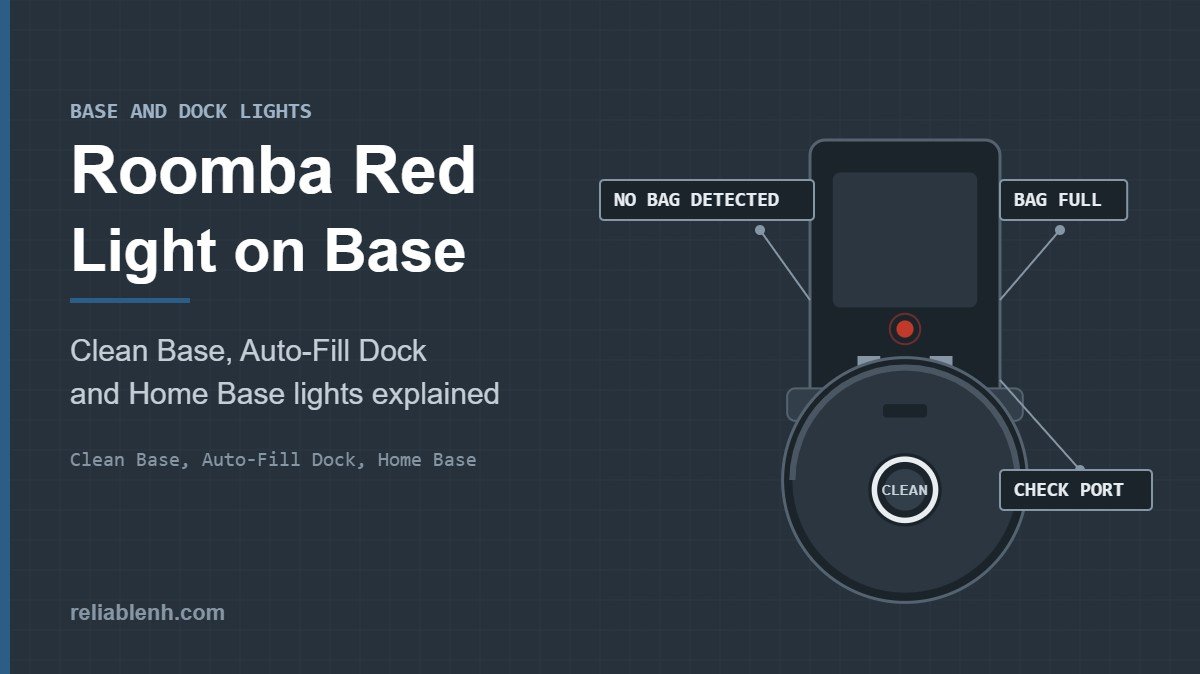
A Roomba red light on base units usually comes from a Clean Base: a solid red LED means the dirt disposal bag is full or the base cannot detect the bag. Replace the bag, slide its card fully into the guide rails, close the lid firmly and check the evacuation port for a clog. On an Auto-Fill Dock, red can also mean the bag drawer or water tank is not fully inserted. A plain Home Base light that switches off after a few seconds is normal, and a robot light ring pulsing red on the dock means the battery is charging but does not yet have enough power to clean.
When you see a Roomba red light on base hardware, which light you are looking at matters, because the dock, the self-emptying base and the robot itself each use red for different messages. This guide sorts them out and gives the fix for each, using iRobot’s own support articles for the Home Base, the Clean Base and the Auto-Fill Dock.
Table of Contents
Roomba Red Light on Base: Which Light Is It?
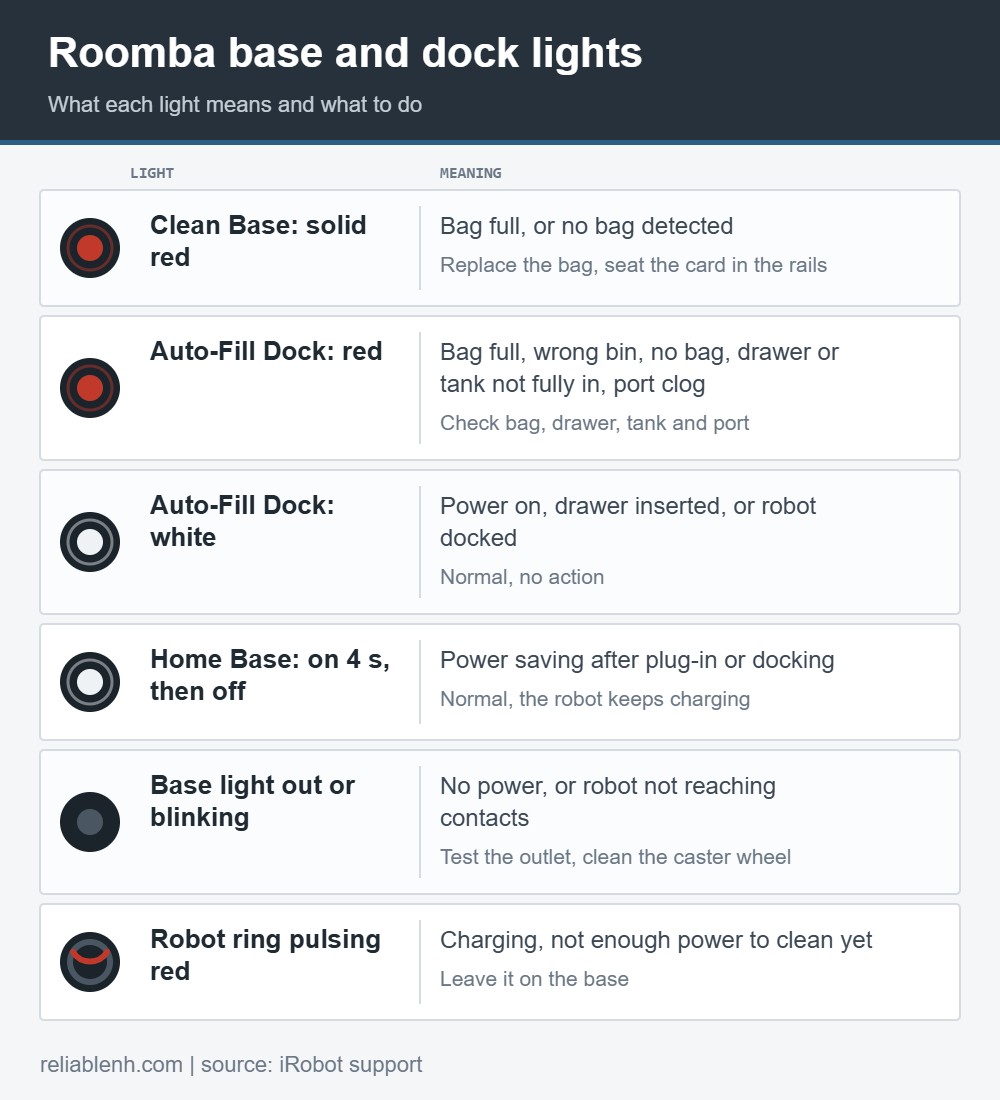
Look at where the light is before you change anything. The table matches the light you see to its meaning.
| What you see | What it means | Fix |
|---|---|---|
| Solid red LED on a Clean Base | The bag is full, or the base does not detect a bag | Replace the bag and seat its card in the rails |
| Red light on an Auto-Fill Dock | Bag full, wrong bin, no bag, drawer or tank not fully in, or a clog in the evacuation port | Check the bag, drawer, tank and port in that order |
| White light for a few seconds on an Auto-Fill Dock | Power on, drawer inserted, or robot docked and charging | Nothing, this is normal |
| Home Base light on for about 4 seconds, then off | Normal power-saving behavior | Nothing, the robot keeps charging |
| Base light out or blinking | No power from the outlet, or the robot is not reaching the contacts | Test the outlet, clean the robot’s caster wheel |
| Robot light ring pulsing red while docked | Charging; not enough charge yet to begin cleaning | Let it keep charging on the base |
Solid Red Light on the Clean Base
The most common Roomba red light on base stations is this one. On the Clean Base Automatic Dirt Disposal, iRobot gives the solid red LED two meanings: the bag is full and needs replacing, or a bag is not being detected. Both are fixed by fitting the bag correctly. You need a replacement bag of the right type, which is covered in the next section.
How to replace the Clean Base bag

- Open the canister. Lift the lid on top of the Clean Base.
- Remove the old bag. Pull up on the plastic card that leads to the vacuum port and lift the bag out. Pulling the card seals the bag, so dust stays inside.
- Throw the used bag away. The bags are single use.
- Fit the new bag. Place it in the canister and slide its plastic card into the guide rails until it sits fully down.
- Close the lid firmly. Press it down until it is completely shut.
If the red light stays on with a new bag, the base is most likely not detecting it. Open the lid, push the card all the way down the rails and close the lid again. A card that sits a little high is a likely reason a fresh bag shows as missing.
Check the bag type for your robot
iRobot now makes more than one bag, and a bag meant for another base may not fit or be detected correctly:
| Bag | Made for | Note |
|---|---|---|
| Original plastic evac bag | Classic i, j, s, Essential and Combo 10 Max series bases | Intended only for the classic models |
| Original cardboard evac bag | Classic models | Cardboard version for the same classic bases |
| New cardboard evac bag | LiDAR-based robots that use the new Roomba Home app | A little larger and holds more debris |
If you are comparing bases or thinking about a self-emptying model, our overview of self-emptying robot vacuums explains how the bags and bases differ.
Red light right after a new bag? Check for a clog
iRobot also asks owners to make sure the vacuum path is not clogged. A blocked evacuation port can stop the base from emptying the robot. With the robot off the base, look into the port where the robot’s bin meets the base and remove any hair, paper or packed debris. Then clean or replace the robot’s filter, because a clogged filter cuts the airflow the base relies on. The routine is in how to clean a Roomba filter.
Red Light on the Clean Base Auto-Fill Dock
The Auto-Fill Dock, which also refills the water tank on combo robots, shows its status through an LED on top of the canister and in the Roomba Home app. Its red light covers more situations than the standard Clean Base:
- The bag is full.
- The wrong bin is fitted.
- No bag is present.
- The bag drawer is not installed all the way.
- There is a clog in the evacuation port.
Two details save time. First, if the dustbin drawer or the water tank is not fully pushed in, the dock turns red, but the app does not tell you until the robot tries to empty or refill and fails. So when the dock is red and the app shows nothing, push the drawer and the tank firmly home. Second, a white light is a good sign: it appears for a few seconds at power-up, when the bag drawer goes in, and when the robot docks and starts charging.
If the Auto-Fill Dock shows no light at all
- Pull out the bag drawer. If the dock has power, the light turns solid red.
- If there is still no light, check the power cord at the back of the dock. Wrapping it tightly around the base can pull it out of its connector.
- Unplug the cord from the wall and from the dock, then plug both ends back in firmly.
- Test the outlet with a lamp. Use another outlet if that one is dead.
- If the outlet works but the dock gets no power, inspect the cord. A damaged cord needs replacing; an undamaged cord with a dead dock points to a dock replacement.
The dock also has a thermal protector. If it trips, the evacuation motor stops running. Unplug the dock, let it cool for 30 minutes, clear the evacuation port and tube, then plug it back in.
Home Base Light: What Is Normal
The standard Home Base, without a dirt disposal unit, has a simple power indicator. When you plug it in, the indicator lights up solid for about 4 seconds and then switches off to save energy. When the robot docks, it lights again for a few seconds and goes dark while the robot keeps charging. A dark Home Base is normal, not a fault.
iRobot also notes that the base only outputs charging power when a robot is on it and touching the charging contacts, so testing the contacts with a multimeter tells you nothing. To check charging, watch the robot instead. Our guide to Roomba charging lights explains what the robot shows while it charges.
If the base light is out or blinking
- Take the robot off the base, turn it over and remove the front caster wheel. Built-up debris there can stop the robot from reaching the charging contacts. Clean the wheel and its housing.
- Plug another device into the same outlet to confirm it is live.
- If the outlet works and the light still stays dark or blinks, contact iRobot Customer Care.
If the robot sits on the base but its battery does not fill, the next steps are in why a Roomba won’t charge. If it cannot find the base at all, see the Roomba won’t dock guide.
Red Light on the Robot While It Sits on the Base
Not every Roomba red light on base reports involves the base itself; sometimes the red light people notice is on the robot. On the i, j, s and Combo series, a light ring pulsing red while the robot is docked means it is charging and does not yet have enough power to begin cleaning. Give it time on the base. A solid red ring is different: that is an error, and pressing CLEAN repeats the message so you can hear the number. The full list of light ring patterns is in our light ring color guide.
If the robot announces a number near the dock, two common ones are Roomba Error 43, which is about the dock area and start position, and Roomba Error 14, which is about the robot’s own bin rather than the base bag.
How to Avoid a Roomba Red Light on Base Stations
- Keep spare bags of the right type so a full bag can be swapped the day the light comes on.
- Empty or replace the robot’s filter regularly. The base pulls debris through the robot’s bin, so a clogged filter slows emptying.
- Look into the evacuation port when you change the bag and remove anything stuck there.
- Push drawers and tanks in firmly on an Auto-Fill Dock after every refill or empty.
- Give the cord some slack instead of wrapping it tightly around the base.
For robots without a self-emptying base, the same care applies to the robot’s own bin, and our guide on how to empty a Roomba covers it.
Roomba Red Light on Base FAQ
Why is there a red light on my Roomba base?
On a Clean Base, a solid red light means the bag is full or the base does not detect a bag. Replace the bag and make sure its card sits fully in the guide rails.
Why is my Clean Base red with a new bag?
The base is probably not detecting the bag. Push the bag’s plastic card all the way down the guide rails, close the lid firmly, and confirm you are using the bag type made for your base.
What does a red light on the Auto-Fill Dock mean?
It can mean a full bag, the wrong bin, no bag, a drawer or water tank that is not fully inserted, or a clog in the evacuation port.
Is it normal for the Home Base light to turn off?
Yes. The power indicator stays on for about 4 seconds after you plug the base in, then turns off to save energy. The robot keeps charging.
Why does my Roomba pulse red while it sits on the dock?
The robot is charging and does not yet have enough power to start cleaning. Leave it docked until the light changes.
Why does my Clean Base not empty the robot?
Check for a full or undetected bag, a clog in the evacuation port and a clogged robot filter. If the dock is hot, unplug it for 30 minutes so the thermal protector can reset.
Can I test the Home Base with a multimeter?
No. iRobot says the base only outputs charging power when a robot is on it and touching the contacts, so a multimeter reading does not show whether it works.
Which Clean Base bag do I need?
Classic i, j, s, Essential and Combo 10 Max bases use the original plastic or cardboard bag. LiDAR-based robots on the new Roomba Home app use the newer, larger cardboard bag.
Sources
Reliable Technologies has no affiliation with iRobot; Roomba, Home Base and Clean Base are iRobot Corporation trademarks. Light meanings and steps come from:
